SnapVent for Chrome
Fill Facebook Marketplace in one click.
Pick a listing you made in SnapVent, and the extension fills in Marketplace's form on your computer: photos, category, condition, the lot. You check it and press Publish.
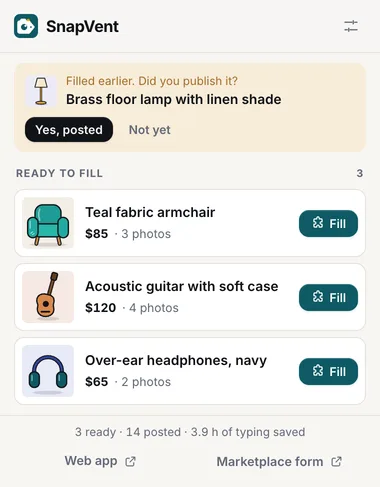
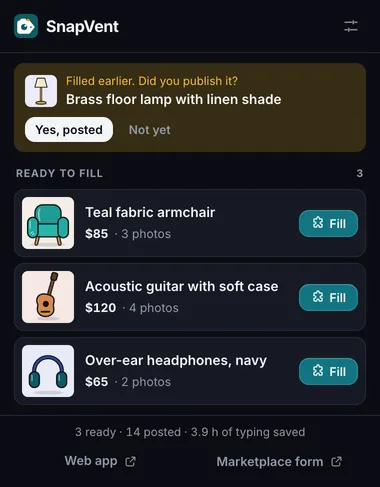
What the extension looks like
How it works
From photos to a filled-in Marketplace form, with you pressing Publish. The listing itself comes from SnapVent's Marketplace listing generator, on your phone or the web.
Add SnapVent to Chrome
Install it from the Chrome Web Store on your computer and sign in with the same account as the SnapVent app.
Make a listing
Snap up to 10 photos in the phone app, or upload them in the web app. SnapVent writes the title, description, condition and price.
Press Fill
Click SnapVent in Chrome's toolbar and press Fill on a listing. It opens Marketplace's form for you: the right one for an item, a vehicle or a property for rent.
Watch it fill
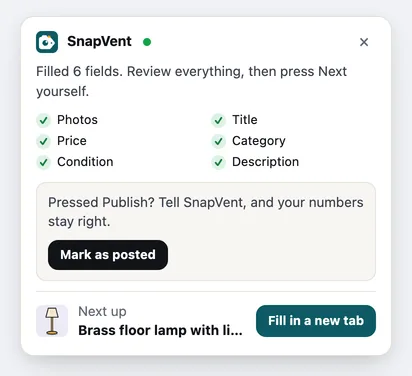
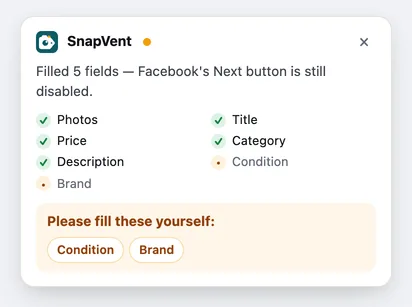
The photos go in first, then the category, then everything else. A card on the page ticks off each field and names any it left for you.
Check it and press Publish
Read it over and press Publish yourself. Then press Mark as posted, so your listing moves along in all your apps.
Fill the next one
The card offers your next ready listing, filled in a new tab, while the one you just filled stays put.
What it fills
Facebook has a different form for each, and SnapVent fills each one. Location, delivery, meetup preferences and boosts are your choice, so it leaves those to you.
Items for sale
Photos, title, price, category, condition and description, plus the details a category asks for, like brand or colour.
Vehicles
Year, make, model, mileage, body style, exterior and interior colour, fuel type and transmission.
Property for rent
Type, bedrooms, bathrooms, size, date available, laundry, parking, and whether cats and dogs are welcome.
Up to 10 photos per listing, uploaded to the form for you.
You stay in charge
- It never presses Publish, and never posts anything on its own.
- It runs only on Marketplace's create-listing page, and only when you pick a listing.
- It never asks for your Facebook password.
- It doesn't read your Facebook feed, messages or friends.
Listing a lot in a day? Facebook can slow down accounts that list quickly, so SnapVent reminds you to pace yourself. Read listing safely on Marketplace or how to list lots of items safely.
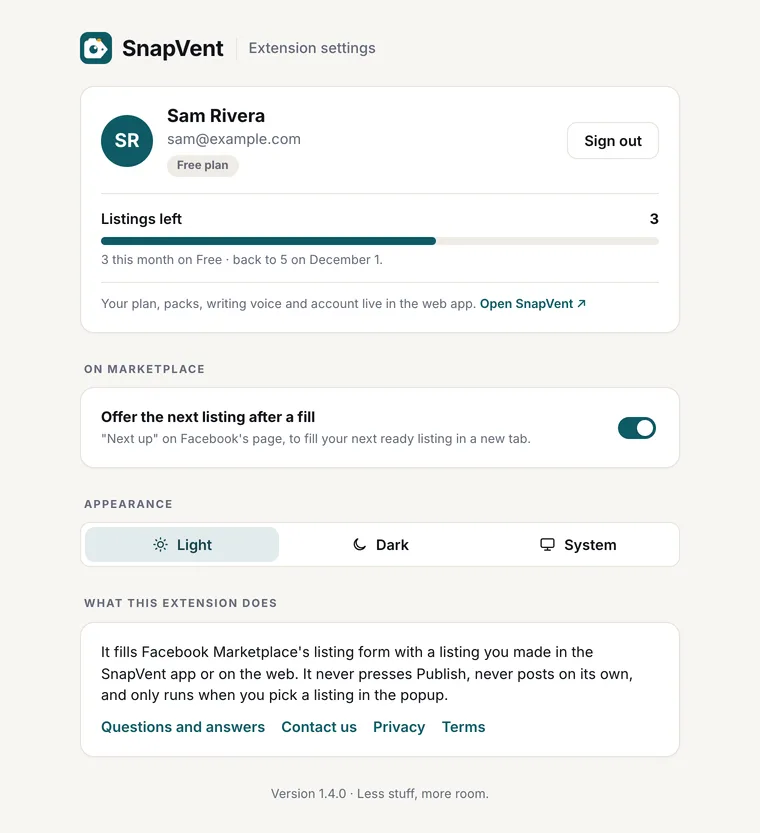
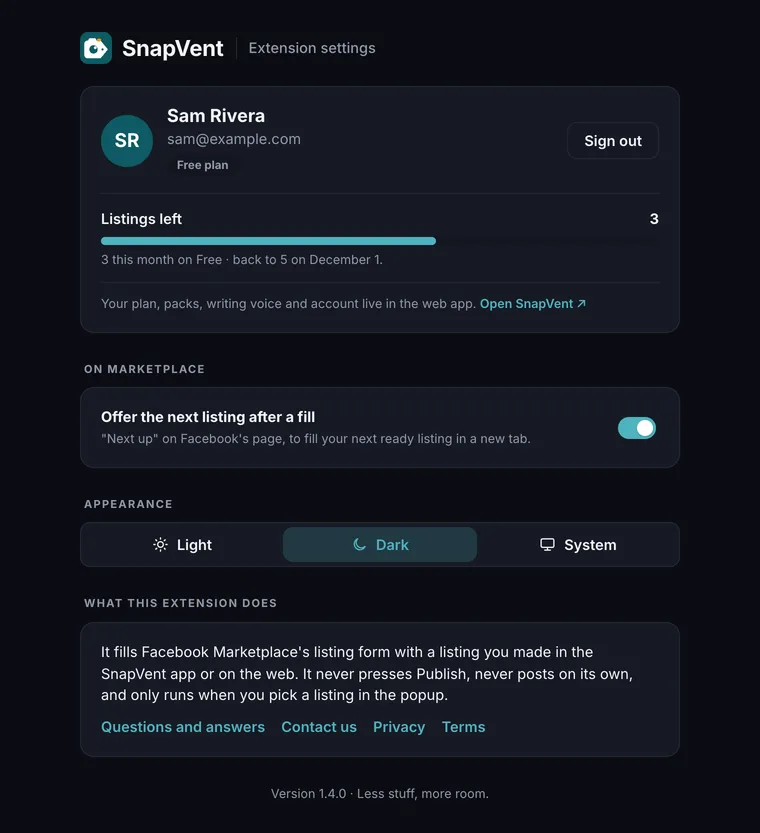
Its settings show how many listings you have left, let you turn off the next-listing offer, and switch between light and dark.
Questions about the extension
Does the SnapVent extension post to Facebook for me?+
No. It fills in Marketplace's form and stops. It never presses Next or Publish, never posts anything on its own, and only runs when you pick a listing in it.
Is it safe for my Facebook account?+
It works only on Marketplace's create-listing page, in the browser you're already signed in to, and you publish every listing yourself, one at a time. It doesn't read your feed, messages or friends. Facebook can still slow down accounts that list a lot very quickly, new ones most of all, so after a busy day of filling, SnapVent reminds you to pace yourself.
Does it need my Facebook password?+
No. It fills the form in the Chrome window where you're already signed in to Facebook, the way a browser fills in your address. You sign in to SnapVent itself with email, Google or Apple.
Does it work on my phone?+
No. Chrome on phones and tablets doesn't run extensions, so the extension needs a computer. On your phone, the SnapVent app lets you copy each field into Marketplace instead.
Which browsers does it work in?+
Google Chrome, version 116 or later, on a Mac, a Windows PC or a Chromebook. It also installs from the Chrome Web Store in Microsoft Edge and Brave on a computer.
What can it fill in?+
Up to 10 photos, the title, price, category, condition and description, and the extra details a category asks for, such as brand or colour. For a vehicle: the year, make, model, mileage, body style, colours, fuel type and transmission. For a property for rent: the bedrooms, bathrooms, size, date available, laundry, parking and whether pets are welcome. Location, delivery and boosts are your choice, so it leaves them as they are.
What if it can't fill a field?+
The card on the page names every field it left for you. Tap a name and the page scrolls to that field, so you can fill it in yourself.
Does it work in my country?+
It works wherever Facebook Marketplace is available, with Facebook set to English. Marketplace's form differs a little between countries and categories, and when the extension meets a field it can't fill, it names it on the card for you.
Does filling a listing use up my listings?+
No. A listing counts once, when SnapVent finishes writing it. Filling it, filling it again and posting it are always free.
What does the extension cost?+
The extension itself is free. It fills the listings you make with SnapVent: 5 a month on the free plan, more on Plus and Pro, or with a pack that never expires.
Add it to Chrome on your computer
Free to install. It fills the listings you make in the SnapVent app or on the web.
Add to Chrome, freeNo listings yet? Start on your phone
Or upload photos in the web app.